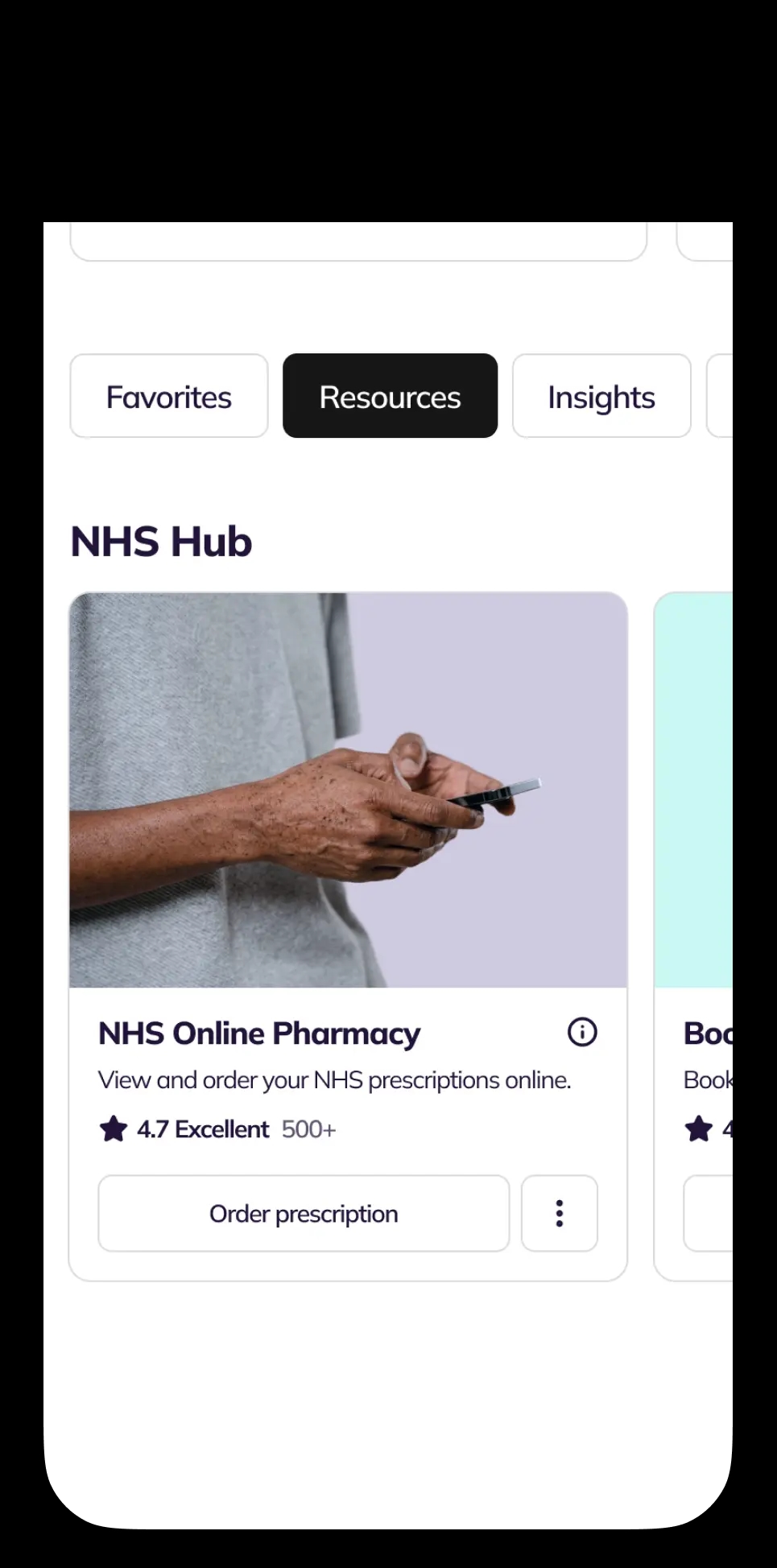
Open NHS Online Pharmacy Service Card, select ‘Order Prescription’
You're viewing our UK site. Prices, available medicines and clinicians depend on where you live.
 United KingdomUK care and pricing. Telehealth, pharmacy and NHS services for UK patients.Current
NowPatient makes it easy to order your NHS repeat prescriptions online and have your medication delivered straight to your door. View your available prescriptions, place your order in minutes, and track delivery – all from one account.
This service is available to NHS patients registered with a GP in England. There is no extra cost to the NHS.
Step-by-step guide to using in-app
Open NHS Online Pharmacy Service Card, select ‘Order Prescription’
Select medications, tap ‘Continue to Cart’
Enter exemptions, add GP notes, tap ‘Checkout’
Review details, then tap ‘Submit Payment’
Check order status in ‘Orders History’
How NHS Online Pharmacy Works
Order your NHS repeat prescriptions from your phone and have them delivered, free, anywhere in England. NowPatient is an NHS-commissioned online pharmacy, so you get the same NHS prescriptions you'd collect on the high street, just without the trip.
You can use NowPatient's NHS Online Pharmacy if you're registered with a GP surgery in England, have active NHS repeat prescriptions, and are happy to nominate NowPatient as your pharmacy. You can switch back to your old pharmacy whenever you like.
The service is commissioned by NHS England, so it's only available in England. Patients in Scotland, Wales and Northern Ireland aren't eligible.
This service is only available to users who have linked their NHS account with NowPatient. Accessing the service depends on how you created your NowPatient account.
If you created your account using NHS Login, your prescriptions should appear in the NHS login service card within around 10 minutes. Navigate to the ‘NHS Hub’ section of your account homepage to find it.
If you are are registered with the NHS in England, but used your email address when creating your NowPatient account, you can still access NHS services by linking your NHS account to your NowPatent account.
Navigate to the NHS Online Pharmacy Service Card, which will appear locked. You can select one of two options to connect your NHS account to activate the service:
NHS Login. Select the button and you will be taken to the NHS login page, where you will need to enter your credentials. Once this is done, you will be returned back to NowPatient, from where the service will be activated. You will also be able to activate all other NHS services.
Linkage Keys. Select the button for Linkage Keys and you will be prompted to enter your three linkage codes (also known as linkage keys). These codes protect your NHS records and keep it secure. Once entered, this service will be activated.
You can request your linkage keys by the following a few simple steps:
Contact your GP practice and ask for access to ‘online services’. Tell them you would like your three linkage keys
Wait for your codes. Your GP surgery will send you a letter or email with three codes: a linkage key (or passphrase), an ODS code (or practice ID), and an account ID. Each practice handles these requests differently, with some asking you to complete an online form, while others prefer email or phone
Enter your codes in NowPatient. Go to your account homepage and find the Book GP Appointment Service Card (it will be locked by default). Select the ‘Connect’ button, which will then activate a modal in which you can enter all three codes to unlock the service
Once this is complete, your prescriptions should appear within 4 hours and will be ready to order.
Tip: The simplest way to request your linkage keys is by email. A downloadable template email is available here to help you make the request.
Alternatively, If you don't yet have NHS login, you can set one up on the NHS website. NHS login does a quick identity check before sharing your records, and you'll need a fully verified account to use it with NowPatient. Your details sync automatically from your NHS account, so any updates you make there flow straight into NowPatient.
The NHS lets you nominate one pharmacy at a time to receive your electronic prescriptions. When you sign up, you nominate NowPatient (Infohealth Pharmacy). You can change your nominated pharmacy anytime, and you don't need to tell your old pharmacy.
If your account is ever de-nominated by accident, just log back in. We'll show you a screen to re-nominate and reactivate your account. If it doesn't reactivate within 4 hours, get in touch and we'll sort it.
From your account homepage, open the NHS Online Pharmacy Service Card and select Order Prescription. Add the medications you need from your Available Prescriptions list, then head to your cart. You'll be asked to confirm whether you're exempt from the NHS prescription charge for each item, and you can leave a quick note for your GP if your surgery accepts them, for example to ask for an extra supply before a holiday.
At checkout, choose your delivery address and method, add any promo codes, and submit your payment (if required) on our secure banking page. NowPatient never sees your card details. Payments are processed by Stripe or Lloyds Bank PLC.
Your order is then sent to your GP for approval, which can take up to 72 hours. Once it's approved, we dispense your medicines and prepare them for delivery. You'll get email and in-app updates at every step.
We deliver to every postcode in England. For your safety, your first NHS order always goes to the address registered with the NHS. After that, you can ship to any saved address, including your workplace.
Everything ships in plain, unmarked packaging. Orders placed Monday to Friday before 3pm go out the same day; later orders go out the next working day. You can choose Royal Mail Tracked & Signed (typically 48 hours), DHL Express (typically 24 hours), or Royal Mail Special Delivery (next working day, before 1pm).
Temperature-sensitive medicines like insulin or weight-loss injections ship in cold-chain packaging, and controlled drugs are sent via a specialist courier so safe custody is maintained throughout.
You can track every order under Orders History. If it hasn't arrived within 10 days of dispatch, let us know. If items are missing, it usually means your GP hasn't approved them, often because the repeat wasn't due, your GP wants a review, or the course has ended. In those cases, your GP surgery is the right next step.
Using NowPatient costs the NHS no more than a high-street pharmacy. The current NHS prescription charge in England is £9.90 per item, but you may be exempt depending on your circumstances. The NHS eligibility checker is the quickest way to find out.
If you pay for several prescriptions a year, a Prescription Prepayment Certificate (PPC) usually saves money. It works like a season ticket: £32.25 for 3 months or £114.50 for 12 months, and you can buy one online from the NHS.
If your doctor prescribes something new after a visit, we'll either create a new order or add it to an existing one and send you a notification.
We only use medication sourced, manufactured and packaged in the UK, and we dispense the brand recorded on your prescription. If you need a specific brand, email support@nowpatient.com or ask your doctor to add the brand name to your prescription. If you've consistently been given the same brand before, we'll see this on your record and keep supplying it.
Our pharmacists are on hand for free medication advice and counselling across every service we run. If you've got a question about something you're taking, just ask.
You can report a suspected side effect in two ways. Tap Report Side Effects in your profile to go directly to the Yellow Card Scheme run by the MHRA, or use the Report Side Effects Service Card on your homepage, which guides you through the process and keeps a record of past reports.
Ask your GP to send your prescription via EPS to Infohealth Pharmacy (provider code FM824) and we'll dispense and deliver your items free of charge. If your GP issues a paper prescription, ask them to recreate it as an EPS prescription using the same provider code, or post it to our pharmacy address.
NowPatient accounts are tied to one person, so each member of your family will need their own account.
You don't need to. Once your account is set up, NowPatient links to your GP automatically so you can view and order your repeats.
For health, hygiene and safety reasons, we can't exchange or refund certain items, including perishables, dispensed or purchased medicinal products, personalised items or cosmetics, and unsealed products or anything worn next to the skin or hair. This isn't an exhaustive list, and it doesn't affect your statutory rights.
If you have unwanted medicines at home, you can drop them at any NHS pharmacy for safe disposal, or post them back to us. Get in touch first and we'll send you a return form with pre-paid postage. Always keep your free proof of posting from the Post Office, as you're responsible for the items until they reach us.
If you ever need a hand, our customer care team and pharmacists are only a message away.
Find answers to the most common questions about ordering your NHS repeat prescriptions online with NowPatient.
NowPatient is an NHS-approved online pharmacy that lets you order your NHS repeat prescriptions from home. Your medication is dispensed by Infohealth Pharmacy and delivered to your door across all UK postcodes.
The service is available to patients registered with a GP surgery in England. It is commissioned by NHS England and is not available in Scotland, Wales, or Northern Ireland.
You can sign up using your email address or your NHS login credentials. Signing up with NHS login is faster — your repeat prescriptions will appear within 10 minutes. If you sign up by email, it can take up to 4 hours for your NHS record to be linked.
If signing up by email, you need your name, gender, date of birth, ethnicity, home address (including postcode), and a contact number. If using NHS login, most of these details are shared automatically from your NHS account.
NHS login is a secure single sign-on service that lets you access multiple digital health services with one email and password. NowPatient is an approved NHS integrated partner, so you can use NHS login to access your account directly.
Yes. You need a fully verified NHS login account to use it with NowPatient. If your account is not yet verified, you will need to complete the NHS verification process first.
No. When you create your account, NowPatient automatically links to your GP surgery. Your GP does not need to be informed separately.
Log in to your account, go to the NHS Hub, and select ‘Order Prescription’ from the NHS Online Pharmacy Service Card. Choose your medications, confirm your exemption status, select a delivery address and method, then submit your payment.
After you place an order, it is sent electronically to your GP for approval. This process can take up to 72 hours. Once approved, we dispense your medication and prepare it for delivery.
Yes, if your GP surgery supports note submissions. This is useful if you need extra supply for a holiday or have a special request. You can type your note during the checkout process.
NowPatient sends status update notifications by email and in-app at every stage of your order, from placement through to delivery.
If your doctor prescribes a new medication, we will create a new order or add it to an existing one. Your order details will be updated and you will receive an in-app notification.
No. NowPatient accounts are unique to each individual. Each family member needs to create their own account to order prescriptions.
Yes. Ask your GP to send your prescription via EPS to Infohealth Pharmacy (provider code: FM824). We will process and dispatch your items with no delivery charge, but you will not have access to order tracking or account features.
Ask your GP surgery to recreate it as an electronic prescription and send it to provider code FM824. Alternatively, the surgery can post the paper prescription to:
NowPatient c/o Infohealth Pharmacy,
28 Chipstead Valley Road,
Coulsdon,
Surrey
CR5 2RA.
We deliver to all postcodes in England. Some rural areas may experience slightly longer delivery times.
All orders are shipped in discreet, unmarked packaging. Temperature-sensitive items (such as insulin) are sent in cold chain-validated packaging. Controlled drugs are handled by a specialist courier service.
We offer Royal Mail Standard Tracked & Signed (2–3 days), DHL Express Tracked (1–2 days), and Royal Mail Special Delivery (next working day, guaranteed before 1pm). Orders placed Monday–Friday before 3pm are dispatched the same day.
Yes. During checkout, you can choose any saved address or add a new one. However, your first NHS prescription order must be delivered to the address registered with the NHS. Subsequent orders can go to any address.
Check the tracking details in the ‘Orders History’ section of your account. If your order has not arrived within 10 days of the dispatch notification, contact us and we will work to resolve the issue.
You may be entitled to free NHS prescriptions if you meet specific eligibility criteria. To claim exemption, the appropriate category must be selected on the prescription form and valid evidence may be required. The exemption categories are listed below:
A: Aged 60 or over, or under 16 (unless date of birth is printed on the form)
B: Aged 16, 17, or 18 and in full-time education
D: Maternity exemption certificate
E: Medical exemption certificate
F: Prescription prepayment certificate
W: HRT-only prescription prepayment certificate
G: Ministry of Defence prescription exemption certificate
L: HC2 (full help) certificate
H: Receiving Income-related Employment and Support Allowance (ESA)
S: Receiving Pension Credit Guarantee Credit (including partners)
U: Receiving Universal Credit and meeting eligibility criteria (Earnings ≤ £435, or ≤ £935 [if UC includes child element or limited capability for work)], in most recent assessment period)
You must only claim an exemption if they are entitled to it. Incorrect claims can result in penalty charges. Proof of eligibility should be provided if requested when collecting medication.
You may be entitled to certain medication items for free as listed below. Make sure you declare this when you checkout your prescription order.
For Contraceptive Use
For STI (Sexually Transmitted Infection) Treatment
For latent or active Tuberculosis (TB) or to treat adverse effects of TB treatment
You can check your exemption status by clicking below
Missing items usually mean your GP did not approve them. Common reasons include ordering too early, your GP wanting to review your medication directly, or your treatment course having expired. Contact your GP surgery for more information.
No. NowPatient is paid the same set dispensing fee per item as any high-street pharmacy in England. There is no additional cost to the NHS.
The current NHS prescription charge in England is £9.90 per item. You may be exempt from paying. Use the NHS eligibility checker to find out.
A PPC is like a season ticket for prescriptions. It lets you get as many NHS prescriptions as you need for a fixed price: £32.25 for 3 months or £114.50 for 12 months. You can buy one online from the NHS.
When you create a NowPatient account, you nominate NowPatient (Infohealth Pharmacy) to receive your electronic prescriptions. You can only nominate one pharmacy at a time in England, but you can switch at any time with no obligation.
Your account is suspended if NowPatient has been de-nominated as your pharmacy. If this was unintentional, log in to see a re-nomination prompt, or contact us by phone or email. Once re-nominated, your account will reactivate within 4 hours.
If you choose to move to another pharmacy, your NowPatient account will be deleted. All your data will be removed except for information we are legally required to retain under our data retention policy.
If you use NHS login, your details sync from your NHS account. Update them through NHS login or ask your GP to make the changes. The updated information will flow through to NowPatient automatically.
We supply the brand recorded on your prescription. If you need a specific brand, contact us at support@nowpatient.com or ask your doctor to add the brand name to your prescription. If you have consistently received the same brand, we can see this on your record and will continue to supply it.
Yes. Our pharmacists provide medication advice and counselling for all dispensing services. If you have questions about your prescribed medication, our pharmacy team is available to help.
You can report side effects through the Yellow Card Scheme (accessed via ‘Report Side Effects’ in your profile settings) or using the reporting assistant on the ‘Report Side Effects’ Service Card on your homepage. The Yellow Card Scheme is run by the MHRA.
Yes. NowPatient never handles your payment details. All payments are processed securely by Stripe or Lloyds Bank PLC through our secure banking page.
For health, hygiene, and safety reasons, we cannot exchange or refund dispensed medicinal products, perishable items, personalised or cosmetic items, or unsealed products worn next to the skin or hair. This does not affect your statutory rights.
Return unwanted medicines to any NHS pharmacy for safe disposal. You can also post them back to us — contact us for a return form with pre-paid postage. The return address is:
NowPatient c/o Infohealth Pharmacy,
28 Chipstead Valley Road,
Coulsdon,
Surrey
CR5 2RA.
Always keep your proof of posting.
Consultations, prescriptions, medication delivery, health monitoring – all in one place.
Wow! Excellent customer service. I submitted an email query, had a call…
Alison Hurst
I do not leave reviews, due to time and a rare condition I have. I…
Sherry M
Great experience getting the med. Clinician was very thorough.
Barbara Hill
Cannot speak highly enough of the service and assistance I have…
CJH
Very good experience - the clinician asked intelligent questions about…
Phil Daoust
Really excellent. Very thorough and professional pharmacist who guided…
Colin Glass
We are a broad skilled and passionate group of clinicians with experience of operating in regulated health systems in the United Kingdom & United States. Providing excellent care and advice is at the heart of everything we do.