Check if you qualify for free NHS support with new medicines
Get coaching and expert guidance on newly prescribed medications for long-term conditions. Book secure video consultations with qualified pharmacists for dose reviews, problem-solving, and follow-up support to ensure your medication works safely and effectively.
 Select your newly prescribed medicine
- Check your eligibility instantly
- Book an NHS-backed video consultation
Service benefits
Tailored to your lifestyle
Maintain consistency
No cost for you
Reduce hospital admissions
Informed decisions
How it works
Step-by-step guide to using in-app
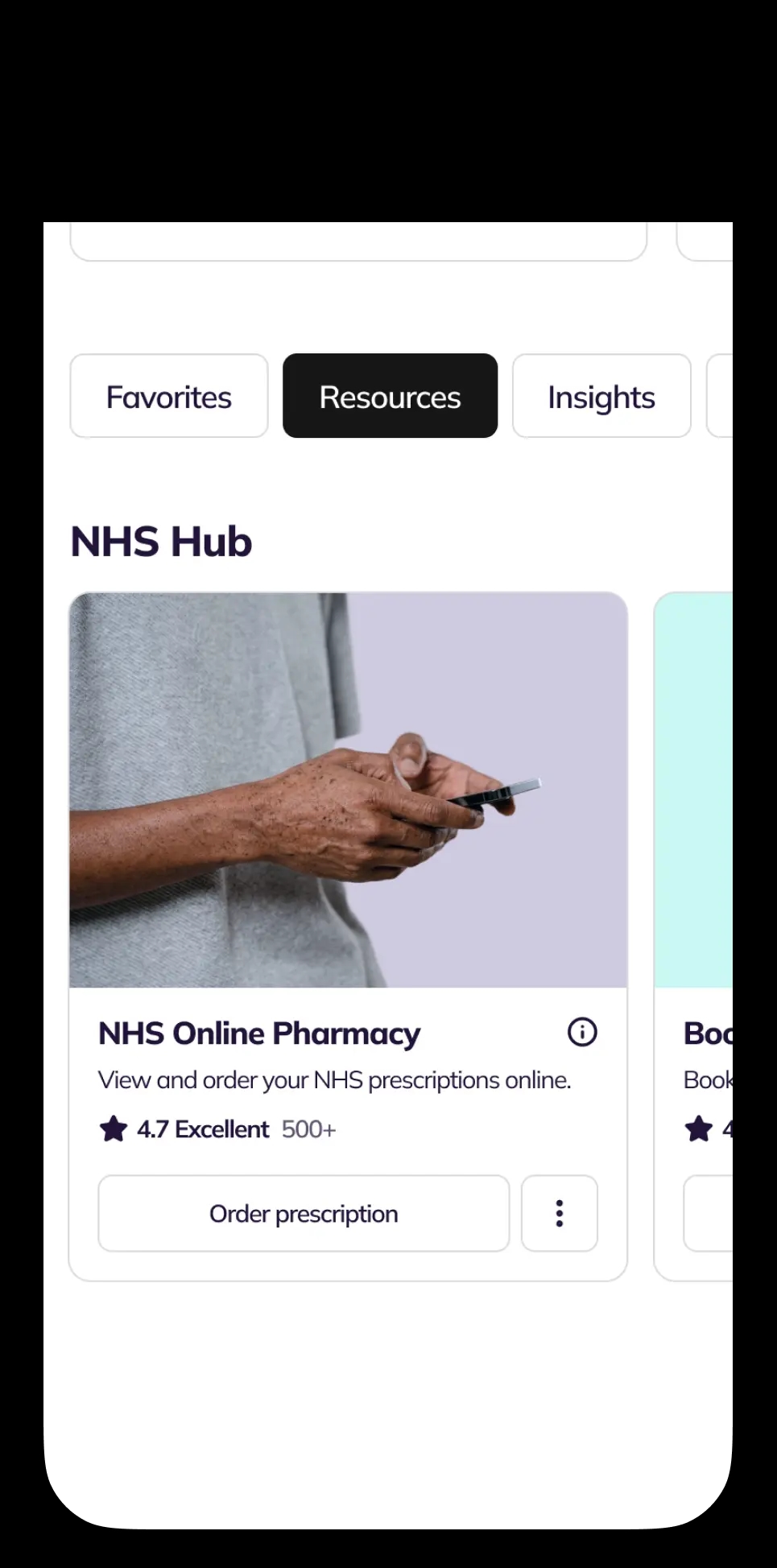
Open NHS New Medicine Service Card to check eligibility
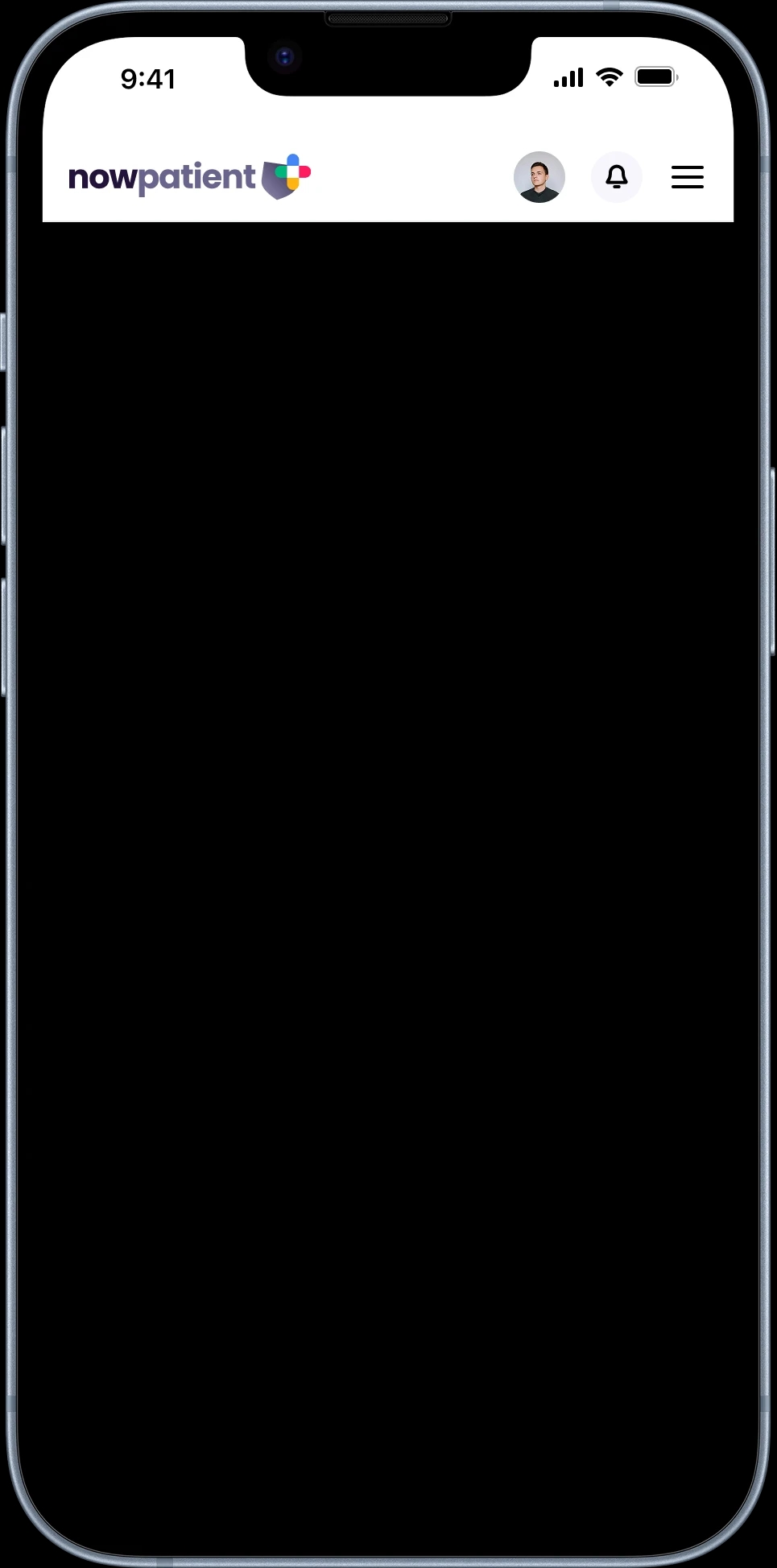
Use the Screening Form to answer questions and check if you qualify
If eligible, complete consultation booking steps
Attend 1st consultation 7–14 days after starting meds
You may be advised to book follow-up after 14–21 days
Eligible NowPatient users are invited automatically
How NHS New Medicine Service Works
Service guide
Started a new medication for a long-term condition? The NHS New Medicine Service (NMS) is a free, NHS-funded virtual consultation service that helps you get the most out of your new medicine. It's available to NHS patients in England.
What the NHS New Medicine Service can do for you
The service is a potentially two-part virtual consultation, funded by the NHS, at no cost to you.
It helps you find out more about your new medicine and how it works, sort out any problems you're experiencing, ask questions and discuss concerns with a clinician, discover easier or more effective ways to take your medication, make your own informed decisions about managing your condition, and improve your health, which could lead to fewer GP and hospital visits.
Qualification
You may qualify for the NMS if you have been prescribed a new medication for any of the following long-term conditions.
Respiratory: Asthma, COPD (Chronic Obstructive Pulmonary Disease)
Cardiovascular: Hypertension, Hypercholesterolaemia, Heart failure, Acute coronary syndrome, Atrial fibrillation, Coronary heart disease, Heart attack, Stroke / transient ischaemic attack (TIA), Venous thromboembolism (VTE), Embolism
Metabolic & Musculoskeletal: Type 2 diabetes, Osteoporosis, Gout.
Neurological: Epilepsy, Parkinson's disease
Other: Glaucoma, Urinary incontinence, Urinary retention, Depression
Eligibility criteria
You can use the NHS New Medicine Service if you're registered with the NHS in England and have been prescribed a new medication for one of the eligible long-term conditions listed above.
You don't need to have your prescriptions dispensed by NowPatient to use this service. NowPatient is also working to allow GPs in England to refer patients directly to the virtual service.
Important: This service is commissioned by NHS England and is only available to patients in England. It isn't available in Scotland, Wales, Northern Ireland or outside the UK.
Cost
The NHS New Medicine Service is completely free. It's funded by the NHS and you won't be charged for any consultations.
How the 3-stage service works
The NMS follows a structured three-stage process designed to support you from the moment you start your new medication.
Stage 1: Engagement
There are two ways you can access the service.
Self-check: you can check whether a new medication you've recently been prescribed is eligible. Go to the NHS New Medicine Service Card in the NHS Hub on your account homepage and select Check Eligibility.
Automatic notification: if NowPatient dispenses a newly prescribed medication that qualifies, we'll send you an in-app and push notification inviting you to take part.
When to book: plan to book your first consultation 7 to 14 days from the point you start taking your new medication.
Stage 2: Intervention (first consultation)
This remote video consultation usually lasts around 10 minutes. Your clinician will assess how you're getting on with your new medicine, identify any problems or concerns, determine if you need further information or support, and offer advice on healthy living or public health topics where appropriate.
At the end of the consultation, the clinician will agree on next steps with you. There are three possible outcomes.
No problems identified: you're adhering to the medication and a follow-up consultation is booked (typically 14 to 21 days later).
Problems identified, no prescriber intervention needed: the clinician agrees remedial steps with you (such as reminder charts or adjustments to how you take the medicine) and a follow-up consultation is booked.
Problems identified, prescriber intervention needed: the clinician refers you back to your prescriber for review.
Stage 3: Follow-up
Your clinician will reassess your adherence, identify any new or ongoing problems, and agree on next steps. There are three possible outcomes.
Adhering to the medication: the service is complete.
Problem identified, solution agreed: you and the clinician agree on a solution. The service is complete.
Problem identified, referral needed: the clinician refers you to your doctor for review. The service is complete.
How to book your consultation
Whether you're engaging through the self-check or an automatic notification, the booking process is the same.
For self-check, select Check Eligibility from the NHS New Medicine Service Card and complete the eligibility screening. If eligible, click Book Consultation and follow the consultation booking steps. For automatic notifications, open the invitation from Notifications on your homepage and follow the consultation booking steps:
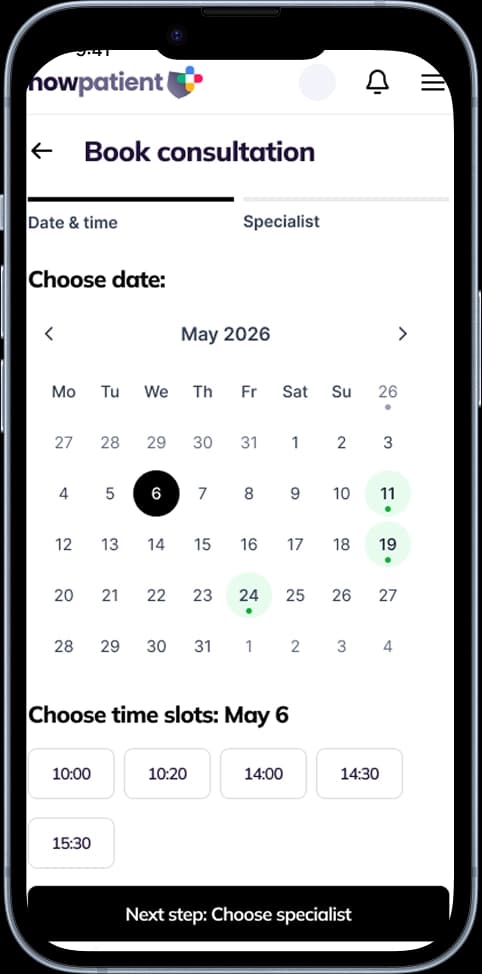
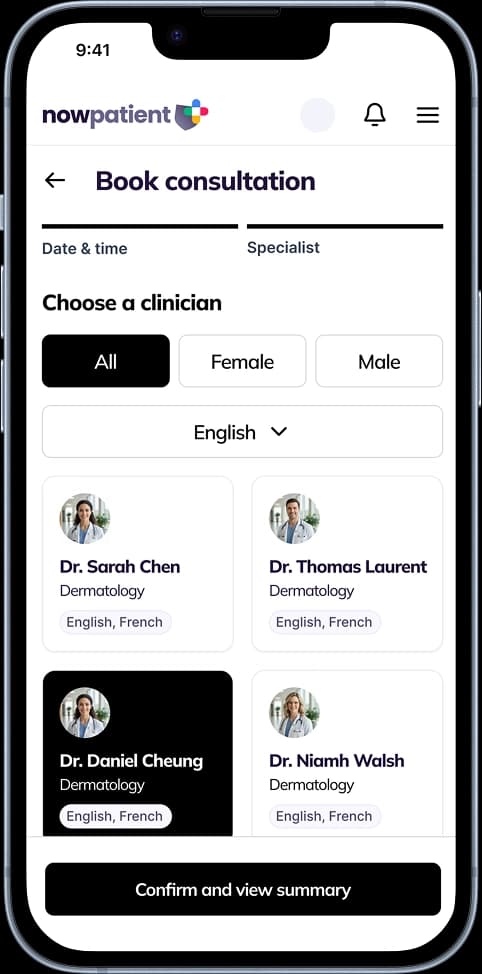
Choose your date, time and clinician. Booking slots are available up to 7 days in advance
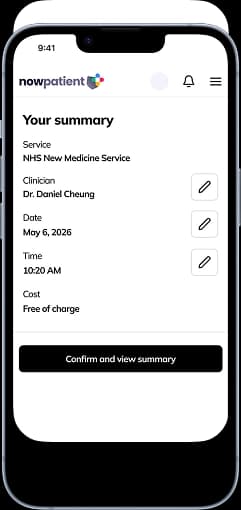
Review your booking details, and confirm
You'll receive in-app and push notifications to remind you of the appointment.
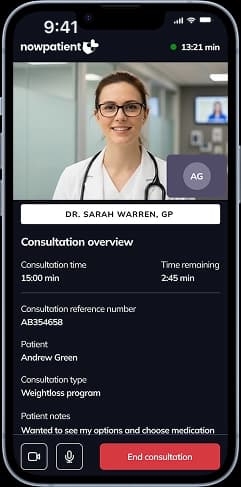
Attend your video consultation. Your clinician will verify your identity, review your health profile, assess your condition, and conduct the service
Book consultation for the service
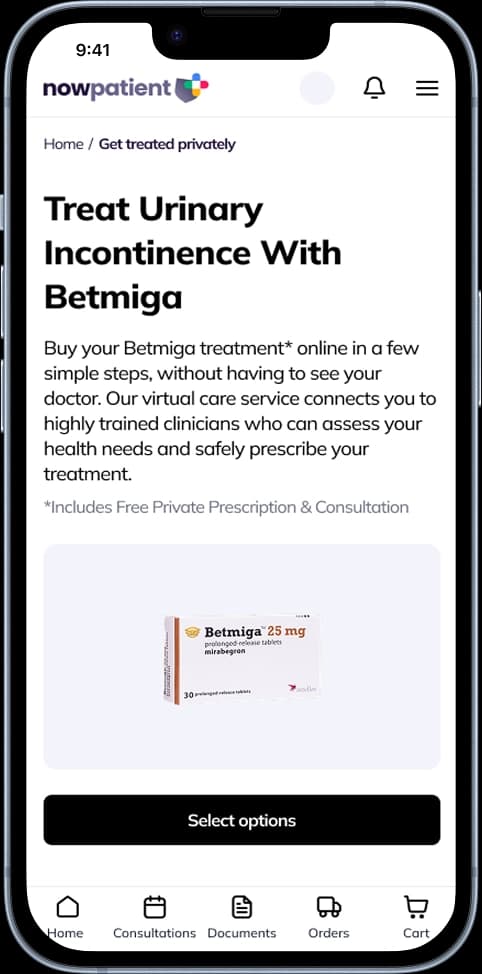
Select consultation date and time
Choose Clinician
View booking summary
Attend your consultation
Preparing for your consultation
Ensure your health profile is up to date. Your clinician may need details of your current medications and supplements, known allergies and adverse reactions, existing medical conditions, previous surgeries or hospitalisations, family medical history (where relevant), current symptoms or health concerns, blood pressure readings (see below), height and weight (to calculate your BMI), and certain blood test results.
Additionally, If you are a UK user registered with the NHS in England, we encourage you to connect your NHS account. You can do this easily from your account homepage. This way our clinicians, subject to your consent, can view your health record to ensure they are advising your safely & appropriately under the terms of the service.
What happens during the video consultation
At the start, your clinician will introduce themselves and confirm your identity. You'll be reminded that you are completing this consultation for yourself and to the best of your knowledge, you must disclose any medical conditions, serious illnesses or operations, and you must disclose any prescription or non-prescription medications you're taking.
You will also be asked to give consent so we can communicate with your GP and share information with NHS England, NHS Improvement, and the NHS Business Services Authority (NHSBSA) if needed.
The clinician then reviews your new medication to ensure that you understand what it has been prescribed for, and that you know what to expect and also to check if you are getting on well with the new medication without any problems.
Booking a follow-up consultation
If your clinician recommends a follow-up, you'll receive an in-app and push notification immediately after your first consultation. Open the recommendation from Notifications on your homepage to schedule the follow-up at a convenient time.
What happens after the consultation
You'll receive a notification summarising the outcome, including any referrals to your GP and advice given by the clinician. This is sent via in-app and push notifications. Go to Notifications on your account homepage to view it.
You may also receive a short survey about your experience. We encourage you to complete it, your feedback helps us improve the service for you and other patients.
Your clinician
NowPatient's clinicians are board-certified pharmacists qualified to prescribe selected medications for six common conditions, as outlined by the NHS.
Every clinician is registered with the appropriate regulatory body, for example pharmacists are registered with the General Pharmaceutical Council (GPhC).
All clinicians undergo thorough background checks, including a Disclosure and Barring Service (DBS) check, and a comprehensive licence verification process.
When you book an appointment, you can view the clinician's full name, licence number and any specialist credentials.
The services our clinicians provide are strictly governed, risk-assessed and regularly reviewed in line with NHS guidelines. The service is delivered via remote video consultations (synchronous consultations) to help ensure clinical safety.
Access to your GP records
As an NHS patient, our clinicians can access your GP record, including medications, observations and investigations. This ensures they can assess you appropriately and provide safe, relevant advice.
Safety
The NHS New Medicine Service is classified as a Class I medical device under UK MDR 2002 regulations for its intended use. It also complies with NHS standards DTAC, DCB 0160 and DCB 0129.
Data Security
NowPatient operates from a HIPAA, DTAC and Cyber Essentials Plus certified compliant platform. This ensures the highest levels of information security and allows us to safely handle Patient Health Information (PHI). Clinicians access our systems on a zero-trust basis, backed by single sign-on (SSO) technologies.
Frequently asked questions
Find answers to common questions about NowPatient’s NHS New Medicine Service (NMS), including eligibility, how the consultations work, and what to expect.
What is the NHS New Medicine Service?
The NHS New Medicine Service (NMS) is a free consultation service that helps you manage a newly prescribed medication for an eligible long-term condition. Through remote video consultations with NowPatient, you can ask questions, resolve problems, and get personalised support — without visiting your GP.
Why does the NHS New Medicine Service exist?
Research shows that 30–50% of prescribed medicines are not taken as recommended, which means medications are often wasted or less effective than they could be. The NMS is designed to improve adherence, help you understand your medicine, and support you in making informed decisions about your care.
How much does the service cost?
The service is completely free. It is funded by the NHS and you will not be charged for any consultations.
Is the NHS New Medicine Service available outside England?
No. The service is commissioned by NHS England and is only available to patients in England. It is not available in Scotland, Wales, Northern Ireland, or outside the UK.
Who is eligible for the NHS New Medicine Service?
You may be eligible if you are registered with the NHS in England and have been prescribed a new medication for an eligible long-term condition. The service covers 21 conditions including asthma, COPD, type 2 diabetes, hypertension, heart failure, epilepsy, depression, and others.
Do I need to have my prescriptions dispensed by NowPatient to use this service?
No. You can use the NHS New Medicine Service even if your prescriptions are dispensed elsewhere. NowPatient is also working to allow GPs in England to refer patients directly to the virtual service.
What conditions are covered by the service?
Eligible conditions include asthma, COPD, type 2 diabetes, hypertension, hypercholesterolaemia, osteoporosis, gout, glaucoma, epilepsy, Parkinson’s disease, urinary incontinence, urinary retention, heart failure, acute coronary syndrome, atrial fibrillation, venous thromboembolism (VTE), embolism, stroke/TIA, coronary heart disease, heart attack, and depression.
How do I find out if my new medication qualifies?
You can check eligibility yourself using the self-check feature on the NHS New Medicine Service Card in the ‘NHS Hub’ on your account homepage. Alternatively, if NowPatient dispenses a qualifying new medication for you, we will automatically send you a notification inviting you to take part.
How many consultations are involved?
The service involves up to two remote video consultations. The first (intervention) consultation assesses how you are getting on with your new medicine. A follow-up consultation may be arranged 14–21 days later if your clinician recommends it. In some cases, only one consultation is needed.
How long does the first consultation take?
The first consultation usually lasts around 10 minutes. Your clinician will assess your adherence, identify any problems, provide advice, and agree on next steps with you.
What happens if problems are identified during the first consultation?
It depends on the nature of the problem. If the issue can be resolved with simple adjustments (such as reminder charts or changes to how you take the medicine), the clinician will agree on steps with you and book a follow-up. If the clinician judges that your prescriber needs to intervene, you will be referred and the service is complete.
How will I know if I need a follow-up consultation?
Your clinician will tell you during the first consultation. If a follow-up is recommended, you will receive an in-app and push notification immediately afterwards with a link to book. Aim to schedule it 14–21 days after your first consultation.
What happens at the follow-up consultation?
The clinician reassesses your adherence and checks for new or ongoing issues. There are three outcomes: you are adhering well (service complete), a problem is identified and a solution is agreed (service complete), or you are referred to your doctor for review (service complete).
How do I book my first NMS consultation?
There are two paths. For self-check, go to the NHS New Medicine Service Card in the NHS Hub, select ‘Check Eligibility’, and complete the AI chatbot screening. If eligible, click ‘Book Consultation’. For automatic notifications, open the invitation from ‘Notifications’ on your homepage and click ‘Book Consultation’.
Book consultation for the service
Select consultation date and time
Choose Clinician
View booking summary
Attend your consultation
When should I book my first consultation?
Plan to book 7–14 days from the point you start taking your new medication. This gives you enough time to experience the medicine before discussing it with your clinician.
Can I choose which clinician I see?
Yes. During booking, you can browse available clinicians and filter by gender and spoken languages. You can view each clinician’s name, licence number, and credentials before selecting.
Will I get a reminder before my consultation?
Yes. You can opt in to receive an SMS reminder 30 minutes before your scheduled video consultation. You will also provide your consultation address and emergency contact details during the booking process.
Who are the clinicians providing this service?
Our clinicians are board-certified pharmacists registered with the General Pharmaceutical Council (GPhC). All clinicians undergo DBS background checks and a comprehensive licence verification process. The conditions and medications they can advise on are strictly governed and reviewed in line with NHS guidelines.
Is the NHS NMS service safe?
Yes. The service is classified as a Class I medical device under UK MDR 2002 regulations. It complies with NHS standards DTAC, DCB 0160, and DCB 0129. Consultations are delivered via live video to ensure clinical safety and appropriate prescribing.
Is my personal health information secure?
Yes. NowPatient operates from a HIPAA, DTAC, and Cyber Essentials Plus certified platform that ensures the highest levels of information security. Clinicians access systems on a zero-trust basis with single sign-on (SSO) technology.
Can the clinician access my GP records?
Yes. As an NHS patient, our clinicians can access your GP record, including your medications, observations, and investigations. This helps them assess your medications and conditions safely and accurately.
How should I prepare for my NMS consultation?
Read the leaflet that comes with your new medicine, write down any questions or concerns, and have your medicine to hand during the video call. This helps you and your clinician make the most of your time together.
What happens after my consultation?
You will receive a notification summarising the outcome, including any referrals to your doctor and advice given. You may also receive a short survey — we encourage you to complete it, as your feedback helps us improve the service.
Do I need to give consent before the consultation?
Yes. During the consultation, we will ask for your consent to provide the service. This allows us to communicate with your GP and share information with NHS England, NHS Improvement, and the NHS Business Services Authority (NHSBSA) when required.
Your health shouldn’t wait.
Consultations, prescriptions, medication delivery, health monitoring – all in one place.

Rated excellent on Trustpilot
Wow! Excellent customer service. I submitted an email query, had a call…
Alison Hurst
I do not leave reviews, due to time and a rare condition I have. I…
Sherry M
Great experience getting the med. Clinician was very thorough.
Barbara Hill
Cannot speak highly enough of the service and assistance I have…
CJH
Very good experience - the clinician asked intelligent questions about…
Phil Daoust
Really excellent. Very thorough and professional pharmacist who guided…
Colin Glass

Meet our medical team
We are a broad skilled and passionate group of clinicians with experience of operating in regulated health systems in the United Kingdom & United States. Providing excellent care and advice is at the heart of everything we do.