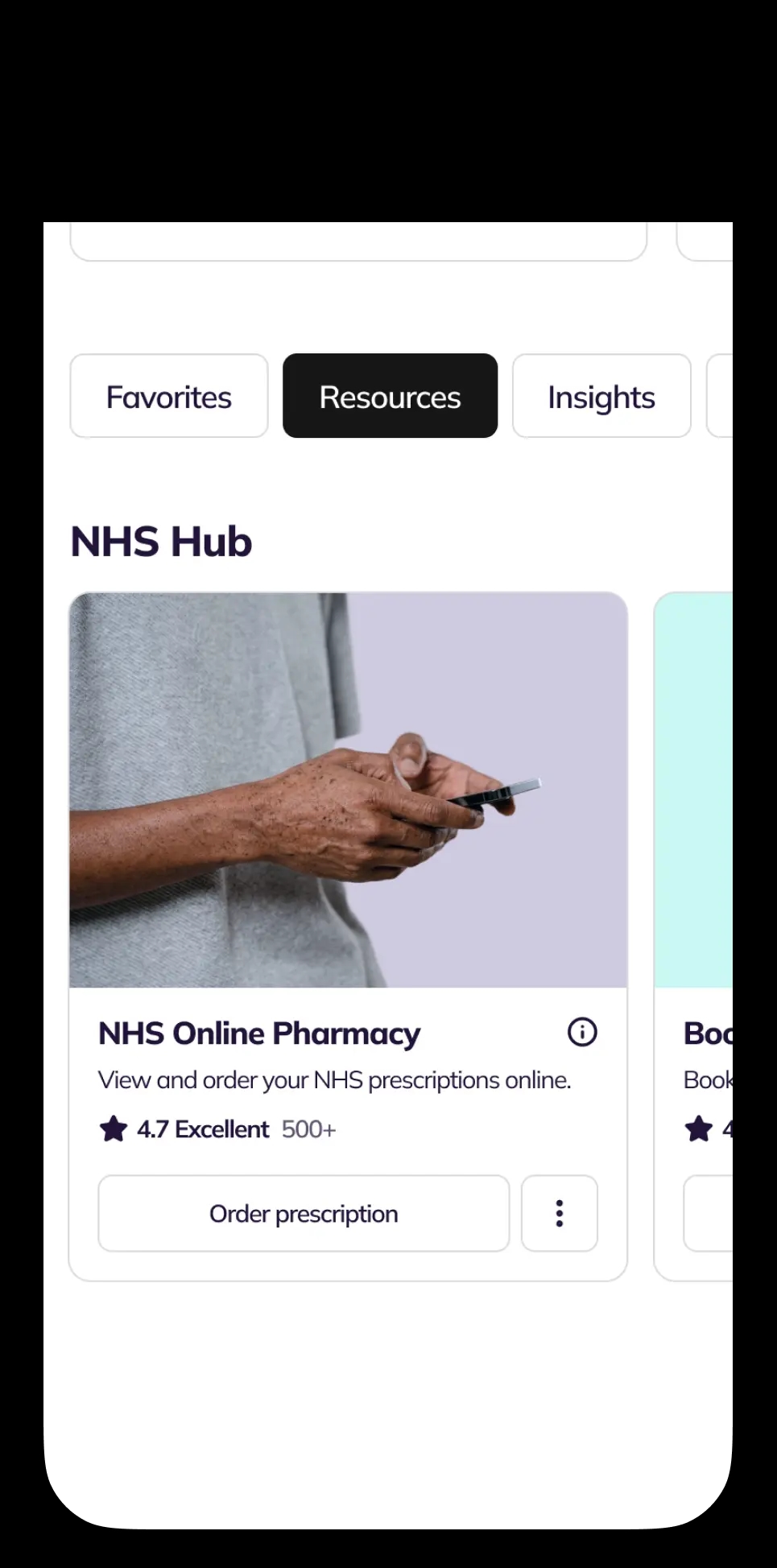
Open GP Records Folder Service Card, tap ‘Options’
You're viewing our UK site. Prices, available medicines and clinicians depend on where you live.
 United KingdomUK care and pricing. Telehealth, pharmacy and NHS services for UK patients.Current
NowPatient brings your full NHS GP record together in one secure folder, including test results, medications, allergies, immunisations and consultation notes. Access your medical history online whenever you need it, share it with clinicians in seconds and stay in control of your health information.
Linked directly to your NHS GP record. Free to use for patients registered with a GP in England.
Step-by-step guide to using in-app
Open GP Records Folder Service Card, tap ‘Options’
If needed, enter Linkage Codes to unlock Service Card
Select the record type you wish to view
View your records on the viewer page
View your records on the viewer page
Apply filters to find specific records easily
How GP Records Folder works
The NowPatient GP Records Folder is a free online service that lets NHS patients in England view their GP health record securely through a NowPatient account.
It is read-only, so you can look at information but not edit it. You may be able to see:
Allergies
Vaccinations / immunisations
Medical conditions or diagnoses
GP appointment notes
Test results
Medicines prescribed by your GP
It does not usually include full hospital, dental, or optician records, unless that information has been sent to and reviewed by your GP.
The GP Records Folder service is available to NHS patients registered with a GP in England. It is not available in Scotland, Wales, or Northern Ireland.
The service is completely free for all registered NowPatient users.
This service is only available to users who have linked their NHS account with NowPatient. Accessing the service depends on how you created your NowPatient account.
The GP Records Folder Service Card will be fully active from the start. Navigate to the ‘NHS Hub’ section of your account homepage to find it.
If you are are registered with the NHS in England, but used your email address when creating your NowPatient account, you can still access NHS services by linking your NHS account to your NowPatent account.
Navigate to the GP Records Folder Service Card, which will appear locked. You can select one of two options to connect your NHS account to activate the service:
NHS Login. Select the button and you will be taken to the NHS login page, where you will need to enter your credentials. Once this is done, you will be returned back to NowPatient, from where the service will be activated. You will also be able to activate all other NHS services.
Linkage Keys. Select the button for Linkage Keys and you will be prompted to enter your three linkage codes (also known as linkage keys). These codes protect your NHS records and keep it secure. Once entered, this service will be activated.
You can request your linkage keys by the following a few simple steps:
Contact your GP practice and ask for access to ‘online services’. Tell them you would like your three linkage keys
Wait for your codes. Your GP surgery will send you a letter or email with three codes: a linkage key (or passphrase), an ODS code (or practice ID), and an account ID. Each practice handles these requests differently, with some asking you to complete an online form, while others prefer email or phone
Enter your codes in NowPatient. Go to your account homepage and find the Book GP Appointment Service Card (it will be locked by default). Select the ‘Connect’ button, which will then activate a modal in which you can enter all three codes to unlock the service
Tip: The simplest way to request your linkage keys is by email. A downloadable template email is available here to help you make the request.
Alternatively, If you don't yet have NHS login, you can set one up on the NHS website. NHS login does a quick identity check before sharing your records, and you'll need a fully verified account to use it with NowPatient. Your details sync automatically from your NHS account, so any updates you make there flow straight into NowPatient.
The GP Records Folder gives you access to six categories of information from your NHS GP record:
Allergies you have
Vaccinations you’ve had
Conditions you’ve been diagnosed with
Notes from appointments at your GP surgery
Results of tests arranged by your GP surgery
Medicines your GP has prescribed
The GP Records Folder Service Card is located in the NHS Hub section of the account homepage. Viewing the Options menu on the Service card will allow you to select any one of the following record types: Allergies, Immunisations, Test Results, Problems, or Medications.
After selecting one, you will see all related records displayed as individual cards with detailed information. The viewer shows the total number of records and lets you apply filters to find specific entries.
Records held by other service providers such as hospitals, dentists, and opticians are not available through the GP Records Folder unless they have been shared with your GP.
To access those records, you will need to contact the relevant provider directly.
Hospital test results that have been sent to and reviewed by your GP will appear in your records. In some areas of England, you can already access hospital records directly, but NHS England does not yet have a timetable for when this will be available everywhere.
You can access the GP Records Folder from any device including smartphone, tablet, laptop, or desktop computer, using your NHS login or NowPatient login credentials.
Your records are only viewable by you. NowPatient cannot see your GP records and will not share them without your consent.
Records are stored securely in line with the NHS privacy notice. Your account is also protected by two-factor authentication (2FA), so only you can access your data.
If you notice a problem with your GP records, contact your GP surgery by email, phone, or in person. You should get in touch if:
You are unable to see your record
Information is missing or has disappeared
You can only see very recent information and need to see older records
There is incorrect information in your record
You can see information that does not belong to you
You no longer want to see your record
Someone is pressuring you for information in your record
You cannot correct information directly.
Speak to your GP about any errors, as they can add the correct information to your record, but the original entry will remain because medical records are legal documents and information cannot always be removed.
If there is a disagreement, your GP may note your point of view on the record alongside the original notes.
If you can access the GP Records Folder but no records appear, your GP practice may not have switched on full access to your records yet. All practices in England should have enabled access to future medical records as of 31 October 2023. If your records are still not showing, contact your GP practice.
In very rare cases, some information may not be visible. This would only happen for specific reasons, for example, if the record contains confidential information about another person, or if access could cause serious harm to you or someone else. You can also ask your GP to hide specific information from appearing in your online records.
A GP should only prevent access if there is a good reason, usually a concern that access could cause harm, or because you asked not to see your records. You have a right to see your medical records. If you disagree with the decision, speak to the practice manager or your GP. If you remain unsatisfied, you can complain through the practice’s complaints procedure.
Your online records may only show information added recently. If you need access to older records, ask your GP surgery to make the historical information visible. You can also request a paper copy of your full medical records through a subject access request.
Find answers to common questions about viewing your NHS GP records online through NowPatient, including access, privacy, and troubleshooting.
The GP Records Folder gives you free, secure, read-only access to your NHS GP health records through your NowPatient account. You can view your allergies, vaccinations, conditions, appointment notes, test results, and prescribed medicines — all in one place.
You can view six categories: allergies, vaccinations (immunisations), conditions (problems), appointment notes, test results, and medications prescribed by your GP.
It includes hospital test results that have been sent to and reviewed by your GP. However, records held solely by hospitals, dentists, or opticians are not available unless they have been shared with your GP. In some areas of England, direct hospital record access is already available, but NHS England does not yet have a timetable for nationwide rollout.
The GP Records Folder is completely free for all registered NowPatient users.
No. The service is commissioned by NHS England and is only available to patients registered with a GP in England. It is not available in Scotland, Wales, or Northern Ireland.
If you signed up with NHS login, your GP Records Folder is active immediately.
If you signed up with your email address or used Google or Apple to sign up, the GP Records Folder on your account homepage will appear with a ‘locked’ symbol.
To activate it, you will need your linkage keys which can be obtained from your GP surgery. Once obtained, click the ‘Connect’ button on the GP Records Folder and you will be presented with a modal in which you can enter these codes. If successfully entered, it will unlock the service card.
Linkage keys are three codes used by the NHS to protect your GP medical record: a linkage key (or passphrase), an ODS code (or practice ID), and an account ID. Contact your GP practice, ask for access to online services, and request your three linkage keys. They will send them by letter or email. A template email is available on the GP Records Folder page to help you make the request.
Yes. You can access the GP Records Folder from any device — smartphone, tablet, laptop, or desktop — using your NHS login or NowPatient login credentials.
Yes. You can request a paper copy of your medical records from your GP practice, usually through a subject access request.
The GP Records Service Card has an Options Menu that lets you choose a record type: Allergies, Immunisations, Test Results, Problems, or Medications. Records are displayed as individual cards with detailed information, and you can apply filters to find specific entries.
No. Your records are only viewable by you. NowPatient cannot see them and will not share them without your consent.
Records are stored securely in line with the NHS privacy notice. Your NowPatient account is also protected by two-factor authentication (2FA), ensuring only you can access your data.
Your GP practice may not have switched on full access to your records yet. All practices in England should have enabled access to future medical records as of 31 October 2023. If your records are still not appearing, contact your GP practice directly.
Your online records may only show information added recently. If you need to see older records, ask your GP surgery to make the historical information visible.
You cannot correct records directly. Speak to your GP — they can add the correct information, but the original entry will remain because medical records are legal documents. If there is a disagreement, your GP may note your point of view alongside the original notes.
Contact your GP surgery immediately by email, phone, or in person. They will investigate and correct the issue.
In very rare cases, some information may not be visible — for example, if it contains confidential information about another person or if access could cause serious harm. You can also ask your GP to hide specific information from your online records.
A GP should only prevent access for a good reason, such as a concern that access could cause harm. You have a right to see your medical records. If you disagree with the decision, speak to the practice manager or your GP, and if necessary, complain through the practice’s complaints procedure.
Contact your GP surgery immediately. They can help you manage access to your records and ensure your information remains private and secure.
Consultations, prescriptions, medication delivery, health monitoring – all in one place.
Wow! Excellent customer service. I submitted an email query, had a call…
Alison Hurst
I do not leave reviews, due to time and a rare condition I have. I…
Sherry M
Great experience getting the med. Clinician was very thorough.
Barbara Hill
Cannot speak highly enough of the service and assistance I have…
CJH
Very good experience - the clinician asked intelligent questions about…
Phil Daoust
Really excellent. Very thorough and professional pharmacist who guided…
Colin Glass
We are a broad skilled and passionate group of clinicians with experience of operating in regulated health systems in the United Kingdom & United States. Providing excellent care and advice is at the heart of everything we do.